Open Source · MIT License · Free Forever

The Most Comprehensive JWT Security Scanner for Burp Suite

JWTLens automatically detects and exploits JWT vulnerabilities with 56 security checks — passive scanning, active attacks, secret extraction, and a built-in token forge.

JWTLens Logo
// Scanning JWT token...
eyJhbGciOiJSUzI1NiIsInR5cCI6IkpXVCJ9.eyJzdWIiOiIxMjM0NTY3ODkwIiwicm9sZSI6ImFkbWluIiwiaWF0IjoxNTE2MjM5MDIyfQ.SflKxwRJSMeKKF2QT4fwpMeJf36POk6yJV_adQssw5c
HIGH Algorithm None attack - signature bypassed
HIGH Weak HMAC secret cracked: "secret"
MED JWT exposed in URL query parameter
HIGH KID path traversal - /dev/null accepted
0
Security Checks
0
Active Attacks
0
Passive Checks
0
Built-in Secrets

One Extension. Complete JWT Coverage.

JWTLens is a Burp Suite extension that automatically intercepts JWT tokens in your HTTP traffic and tests them against the full JWT attack surface — no manual effort required.

Passive Scanning

23 checks run automatically as you browse — detecting token leakage, weak cookies, missing claims, sensitive data exposure, and dangerous header parameters. Zero extra traffic.

Active Attacks

33 attack vectors including algorithm confusion, signature bypass, KID injection (SQLi, path traversal, command injection), header injection, claim tampering, and known CVEs.

Secret Extraction

Passively monitors all responses for hardcoded JWT secrets, private keys, JWKS structures, and Base64-encoded secrets. Discovered secrets are automatically fed into brute force attacks.

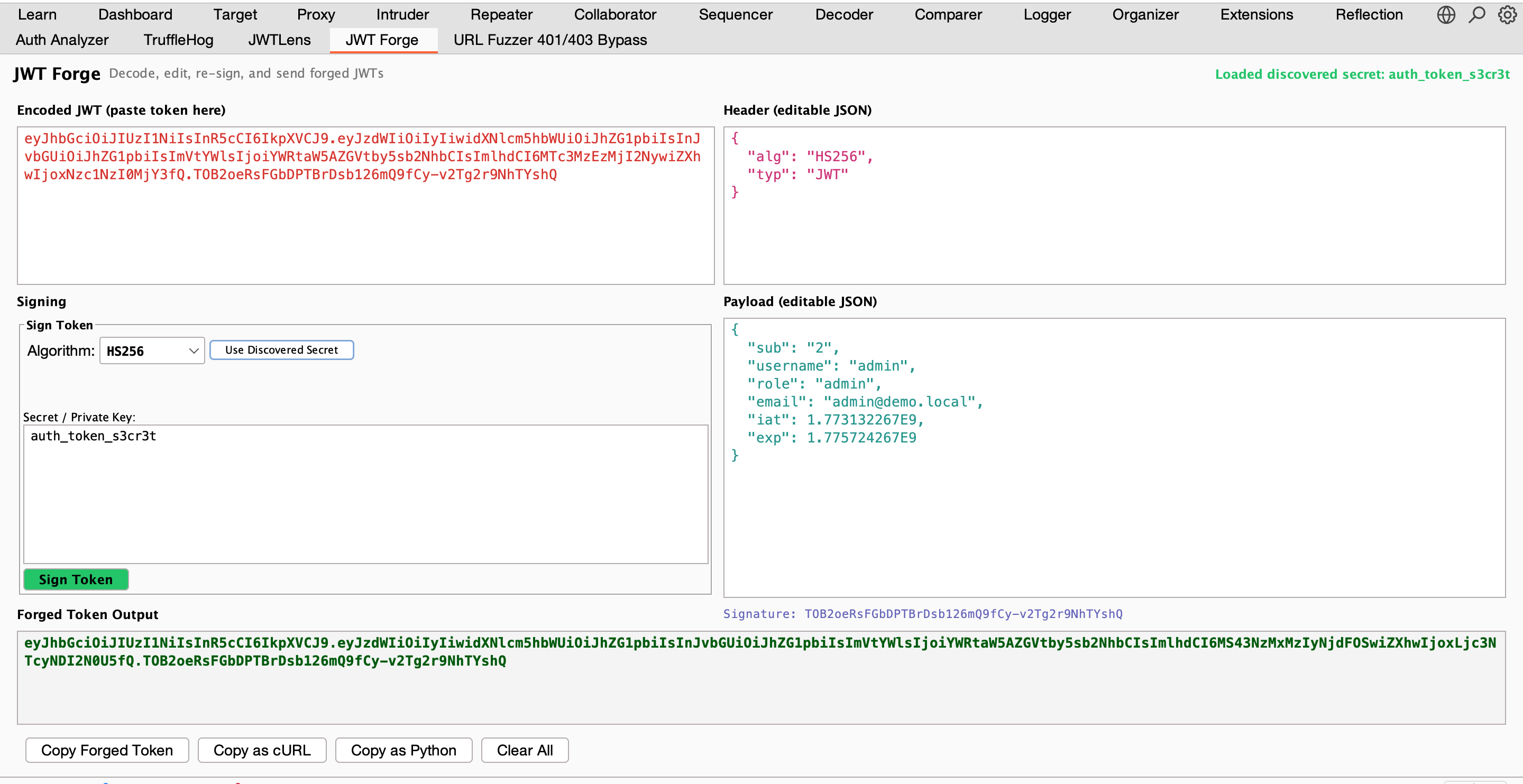
JWT Forge

Built-in token editor — paste any JWT, edit header and payload as JSON, sign with any algorithm and secret, copy as cURL or Python. Like jwt.io but inside Burp Suite.

Built to Break JWT Security

Every attack vector from the JWT security cheatsheet, automated and integrated into your Burp workflow.

Critical Attack

Algorithm Confusion (RS256 → HS256)

The most impactful JWT attack — properly implemented. JWTLens fetches real public keys from JWKS endpoints, OpenID configuration, and passively extracted keys. Tests each key in both DER and PEM encoding as HMAC secret.

  • Fetches JWKS from /.well-known/jwks.json and 5+ paths
  • Follows jwks_uri from OpenID Configuration
  • Uses public keys discovered by Secret Extractor
  • Tests DER and PEM encodings as HMAC secrets
  • Smart key selection by kid, use=sig, or alg=RS*
algorithm-confusion.jwt
// Original token (RS256)
{
  "alg": "RS256",
  "typ": "JWT"
}

// JWTLens attack (HS256 with public key)
{
  "alg": "HS256",
  "typ": "JWT"
}
// Signed with server's RSA public key
// as HMAC secret = valid signature
Injection Suite

KID Parameter Injection

The kid (Key ID) parameter is a goldmine for injection attacks. JWTLens tests four injection categories with multiple payloads each, all properly signed so the server processes them.

  • Path Traversal — 10+ paths including /dev/null, /etc/hostname
  • SQL Injection — UNION SELECT, OR bypass, error-based
  • Command Injection — time-based with sleep payloads
  • LDAP Injection — wildcard and filter manipulation
kid-injection.jwt
// KID Path Traversal
{
  "kid": "../../../dev/null",
  "alg": "HS256"
}
// Signed with empty string (null file)

// KID SQL Injection
{
  "kid": "' UNION SELECT 'secret' --",
  "alg": "HS256"
}
// Signed with "secret" as key
Intelligence

Passive Secret Extraction

JWTLens silently monitors every response for JWT-related secrets. Found secrets are automatically prepended to the brute force wordlist and public keys are fed into algorithm confusion attacks.

  • Hardcoded secrets: JWT_SECRET = "...", jwtSecret: "..."
  • RSA/EC private keys in PEM format
  • Public keys for algorithm confusion attacks
  • Inline JWKS and JWKS URL references
  • Base64-encoded secrets: atob("..."), Buffer.from("...")
  • False positive filtering (ignores templates, placeholders)
extracted-secrets.log
// Found in app.bundle.js
const JWT_SECRET = "auth_token_s3cr3t";

// Found in config.json response
{
  "jwtSecret": "my-super-secret-key"
}

// Found in /api/debug endpoint
-----BEGIN RSA PRIVATE KEY-----
MIIEpAIBAAKCAQEA0Z3VS5JJcds...

All 56 Security Checks

Organized by attack category. Every check reports with proper severity, confidence, and remediation guidance.

Signature Bypass 5

  • HIGH Algorithm None (16 case permutations)
  • HIGH Invalid signature accepted
  • HIGH Signature stripping (empty signature)
  • HIGH Null signature bytes accepted
  • HIGH Payload modification without re-signing

Algorithm Attacks 3

  • HIGH RS256 to HS256 confusion (JWKS parsing)
  • HIGH Cross-algorithm signing (HS384, HS512)
  • HIGH Forged public key - Sign2n

KID Injection 4

  • HIGH Path traversal (10+ paths)
  • HIGH SQL injection (UNION, OR, error-based)
  • HIGH Command injection (sleep-based)
  • HIGH LDAP injection

Header Injection 5

  • HIGH JWK self-signed key injection
  • HIGH JKU URL injection
  • MED JKU SSRF pingback detection
  • HIGH X5U URL injection
  • HIGH X5C certificate injection

Weak Keys 3

  • HIGH Empty secret key accepted
  • HIGH Weak secret brute force (200+ secrets)
  • HIGH Weak RSA key size (< 2048 bits)

Token Lifetime & Claims 5

  • HIGH Expired JWT accepted
  • MED Not-before (nbf) not enforced
  • HIGH Claim tampering (privilege escalation)
  • MED Subject claim enumeration
  • MED Clock skew tolerance exceeded

CVEs & Crypto 2

  • HIGH CVE-2022-21449 Psychic Signatures
  • LOW ECDSA signature malleability

Recon & Logic 6

  • INFO JWKS endpoint discovery
  • LOW typ header manipulation accepted
  • MED Cross-service token confusion
  • MED Token valid after logout
  • MED Token valid after password change
  • HIGH JWKS spoofing via well-known override

Token Detection & Leakage 4

  • INFO JWT detected in HTTP traffic
  • MED JWT exposed in URL query parameter
  • MED JWT exposed in URL fragment
  • MED JWT leaked in HTTP response body

Cookie Security 3

  • MED Missing HttpOnly flag
  • MED Missing Secure flag
  • LOW Missing SameSite attribute

Token Lifetime 3

  • HIGH Missing expiration (exp) claim
  • LOW Excessive lifetime (> 24 hours)
  • INFO Expired JWT still sent in requests

Claim Validation 4

  • LOW Missing issuer (iss) claim
  • LOW Missing audience (aud) claim
  • INFO Missing not-before (nbf) claim
  • INFO Missing unique identifier (jti) claim

Sensitive Data & Structure 3

  • MED Sensitive data in payload (PII, API keys)
  • INFO Symmetric algorithm (brute force advisory)
  • INFO Nested JWT detected

Dangerous Header Parameters 6

  • INFO kid parameter present
  • LOW jku parameter present
  • LOW x5u parameter present
  • LOW x5c parameter present
  • LOW jwk parameter present
  • MED Weak/deprecated signing algorithm

Passive Secret Extraction 6

  • HIGH JWT signing secret extracted from JS/JSON/HTML response
  • HIGH RSA/EC private key exposed in HTTP response
  • LOW RSA public key found in HTTP response
  • LOW Inline JWKS found in response
  • INFO JWKS URL reference discovered
  • HIGH Base64-encoded secret decoded from response

See It in Action

Two dedicated Burp tabs — a findings dashboard and a live token editor — seamlessly integrated into your workflow.

JWT Security Guides

In-depth guides on JWT attacks, testing methodology, and how to exploit common vulnerabilities.

What Makes It Different

Compared to existing JWT Burp extensions, JWTLens covers more attack vectors with better automation.

Proper JWKS Parsing

Fetches real public keys from well-known endpoints for algorithm confusion — not just generated key pairs

Secret Extraction

Passively discovers hardcoded secrets from JS/JSON responses and auto-feeds them into attacks

Request + Response Scanning

Extracts and tests JWTs from both requests and response bodies (login endpoints, config APIs)

KID Injection Suite

4 injection categories (path traversal, SQLi, command injection, LDAP) with multiple payloads each

Custom Wordlists

Upload your own wordlist for brute force, append or replace the built-in 200+ secret list

Smart Deduplication

Tracks unique JWT per host to prevent scanning the same token multiple times

Install in 3 Steps

01

Download

Grab the latest jwtlens-1.0.0.jar from GitHub Releases.

Go to Releases →
02

Load in Burp

Extensions → Installed → Add → Select JAR file. Java 17+ required.

03

Start Scanning

Browse normally. Passive checks run automatically. Right-click any request for active attacks.

Requirements

Java 17+ Burp Suite 2024.1+ Professional or Community Edition

Ready to Find JWT Vulnerabilities?

JWTLens is free, open source, and built for security professionals.